Construum Text Assistant: how people opt in
This page shows how account holders join the Construum Text Assistant. It does not collect phone numbers or consent: enrollment happens only inside the signed in Construum app.
Who can join
Only a contractor or administrator signed in to their own Construum account. Nobody is enrolled by anyone else, from a purchased list, or by texting a keyword first.
The steps, inside the Construum app
- The account holder opens Settings, then Text Assistant.
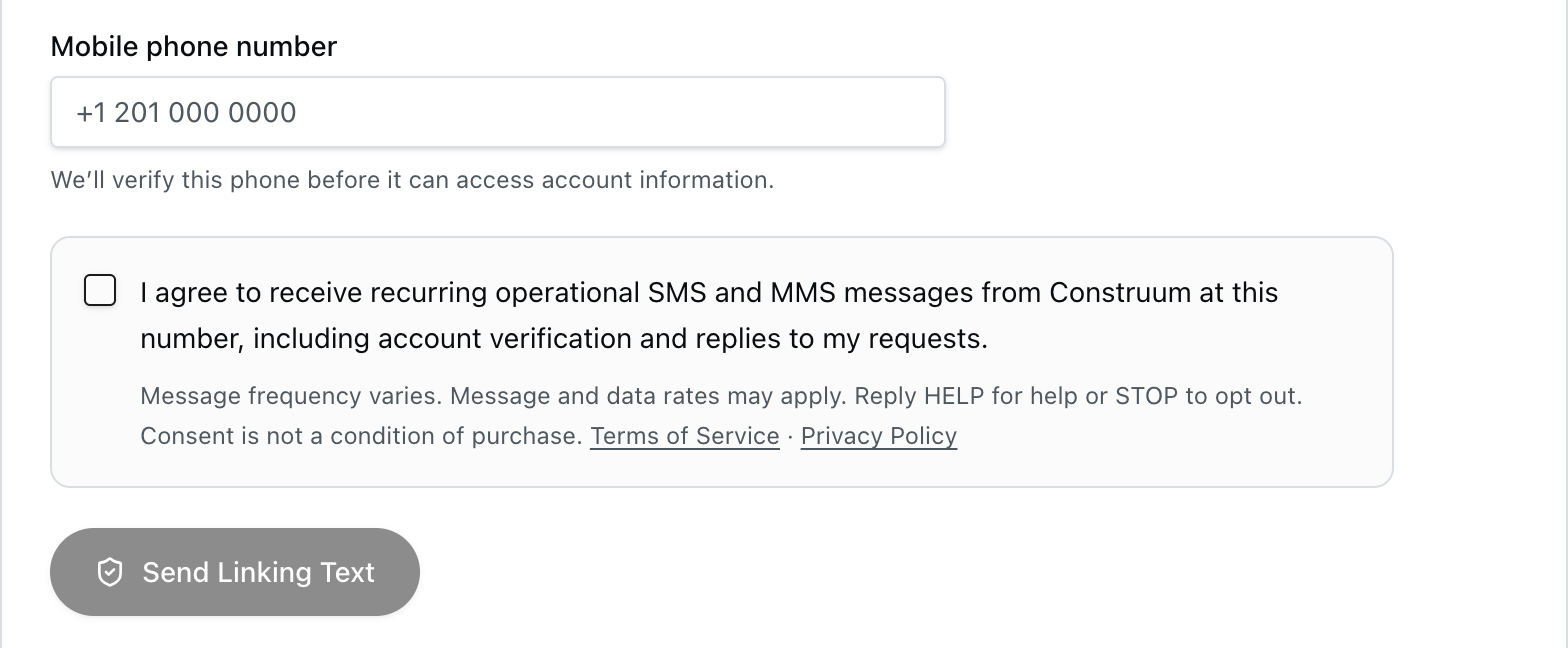
- They enter their own mobile phone number.
- They check this box, which starts unchecked:
☐ I agree to receive recurring operational SMS and MMS messages from Construum at this number, including account verification and replies to my requests.
Message frequency varies. Message and data rates may apply. Reply HELP for help or STOP to opt out. Consent is not a condition of purchase. Terms of Service · Privacy Policy
- They select Send Linking Text. The button stays off until the box is checked.
- Construum texts a six digit code to the number:
Construum Text Assistant: reply LINK 482913 within 10 minutes to connect this phone to Kestrel Building Co. Message frequency varies. Message and data rates may apply. Reply HELP for help or STOP to opt out.
- They reply LINK and the code from that phone. Only then is the phone connected, and Construum confirms:
Construum Text Assistant: you're connected. Message frequency varies. Message and data rates may apply. Reply HELP for help or STOP to opt out.
Screenshot of the enrollment screen
Opting out and help
Reply STOP at any time to stop messages, or HELP for help. Questions: construum@gmail.com. Full details are in our Text Messaging Terms and Privacy Policy.